


My first work-from-home corner was a 32-inch desk squeezed between a bookshelf and a doorframe. The laptop fit, but nothing else did, and every workday ended with papers sliding off the edge. A small desk does not need a bigger room. It needs a setup where every inch has a job, storage lives above or below the surface instead of beside it, and the chair, screen, and lamp all fit the footprint you actually have.
This guide covers 12 small desk setup ideas for desks under about 48 inches wide, in bedrooms, studios, closets, and shared rooms. Each idea names real sizes, real costs, and a difficulty label, so you can pick the setup that fits your room, your budget, and whether you rent or own.
Quick takeaways
- Measure first: a laptop-only desk can work at 30 inches wide, but a monitor plus external keyboard needs 36 to 42 inches.
- Move storage off the surface: wall shelves, a pegboard, or a rolling unit under the desk free more room than any organizer on top.
- Use arms and stands: a monitor arm or laptop stand lifts the screen to eye level and hands back the space underneath.
- Pick a chair that tucks fully under the desk, with no arms that catch on the edge.
- Renters can skip drilling: leaning ladder desks, rolling carts, and clamp-on lights give a full setup with no wall holes.
1. Fold-down wall desk that disappears after work

A fold-down desk mounts to the wall and folds flat when the workday ends, which makes it the right call for rooms that serve two jobs, like a living room or a guest bedroom. Look for a model with a fold-down surface at least 30 inches wide and 16 inches deep, with small shelves or pockets inside the cabinet for pens, chargers, and a notebook. Mount it into wall studs with hardware rated above the loaded weight, since typing and leaning put shifting weight on the brackets. Keep the setup laptop-only or with one slim monitor, and store the chair elsewhere when the desk is folded.
Try this: mount a small cork board inside the cabinet door for notes, so nothing loose sits on the surface.
Cost: $$. Difficulty: Moderate.
2. Cloffice desk inside a closet with doors that close

A cloffice turns an unused closet into a compact office by removing the doors or keeping them to close when work ends. Fit a desktop board across the closet at standard desk height, about 29 to 30 inches, and add one shelf above for books and a small storage box. Closets trap heat, so keep the doors ajar while you work or swap to louvered doors if your lease allows it, and never block a vent with bins or cable bundles. A USB fan near the top of the closet moves warm air out, and an LED strip under the shelf gives even light without stealing surface space.
Try this: paint the inside of the closet a light shade so the small space reads brighter on video calls.
Cost: $$. Difficulty: Involved.
3. Ladder desk with shelves stacked above

A ladder desk leans against the wall and pairs a small work surface with shelves above it, which suits narrow hallways and tight bedroom corners. The desk surface usually runs 30 to 36 inches wide, and the shelves hold books, a printer, or storage boxes without taking floor space. Anchor the top of the unit to the wall with an anti-tip strap, since a leaning unit can shift when you lean on it or pull a drawer. Renters like this option because it needs only one or two small wall fixings, and some landlords allow it where a full wall-mounted desk would not pass.
Try this: put the heaviest items on the lowest shelf so the unit stays stable.
Cost: $$. Difficulty: Easy.
4. Rolling laptop cart that parks beside the sofa

A rolling laptop cart works when space is extremely limited, because it slides next to the bed, sofa, or kitchenette and rolls away when done. Pick a cart with a top at least 24 inches wide and 16 inches deep, lockable casters, and a lower shelf for a notebook and charger. Lock the casters every time you sit down to work, since a cart that drifts makes typing and video calls harder. This setup suits laptop-only work best, and it suits multipurpose rooms where a fixed desk would block a walkway or a door swing.
Try this: keep a small basket on the lower shelf for the charger and notebook, so the cart parks cleanly.
Cost: $. Difficulty: Easy.
5. Narrow console desk against the wall

A narrow console desk, 12 to 16 inches deep, creates a workspace that barely intrudes into the room, which helps in studios and shared living rooms. Pair it with a small stool or armless chair that tucks fully underneath, and keep the setup laptop-only, since a deep monitor stand will not fit on a 12-inch surface. A clamp-on lamp on the rear corner gives task light without taking surface space, and a slim wall shelf above holds the few items you reach for daily. Measure the walkway in front of the desk before you buy, so the chair still pulls out without hitting furniture.
Try this: use a laptop stand to lift the screen to eye level, since a shallow desk leaves no room for a monitor riser.
Cost: $$. Difficulty: Easy.
6. Single monitor on an arm with the laptop closed

One monitor on an arm, with the laptop closed on a vertical stand or a shelf, gives the cleanest small-desk layout for many workers. The arm clamps to the back edge of the desk and frees the full surface underneath the screen, while a dock under the desk connects the laptop with one cable. Choose a monitor of 24 to 27 inches, since anything larger crowds a desk under 42 inches wide, and set the screen so your eyes meet the top third of the display. A dual arm only makes sense if both screens are 24 inches or smaller, or if one is a portable display.
Try this: mount a small USB-C dock behind the monitor so only one cord reaches the laptop stand.
Cost: $$. Difficulty: Moderate.
7. Laptop stand plus external keyboard zone

A laptop stand plus an external keyboard and mouse turns a small desk into an ergonomic setup without buying a monitor. Raise the laptop so the top third of the screen sits at eye level, center the keyboard with 8 to 10 inches of desk edge in front for wrist comfort, and put the mouse on your dominant side. A compact or split keyboard helps on short-depth desks, since a full-size board pushes your shoulders wide. This layout suits desks as narrow as 30 inches, and it suits workers who travel with the laptop and want the same setup at home.
Try this: add a small footrest so your hips sit slightly above your knees on a low chair.
Cost: $. Difficulty: Easy.
8. Pegboard wall for office supplies above the desk
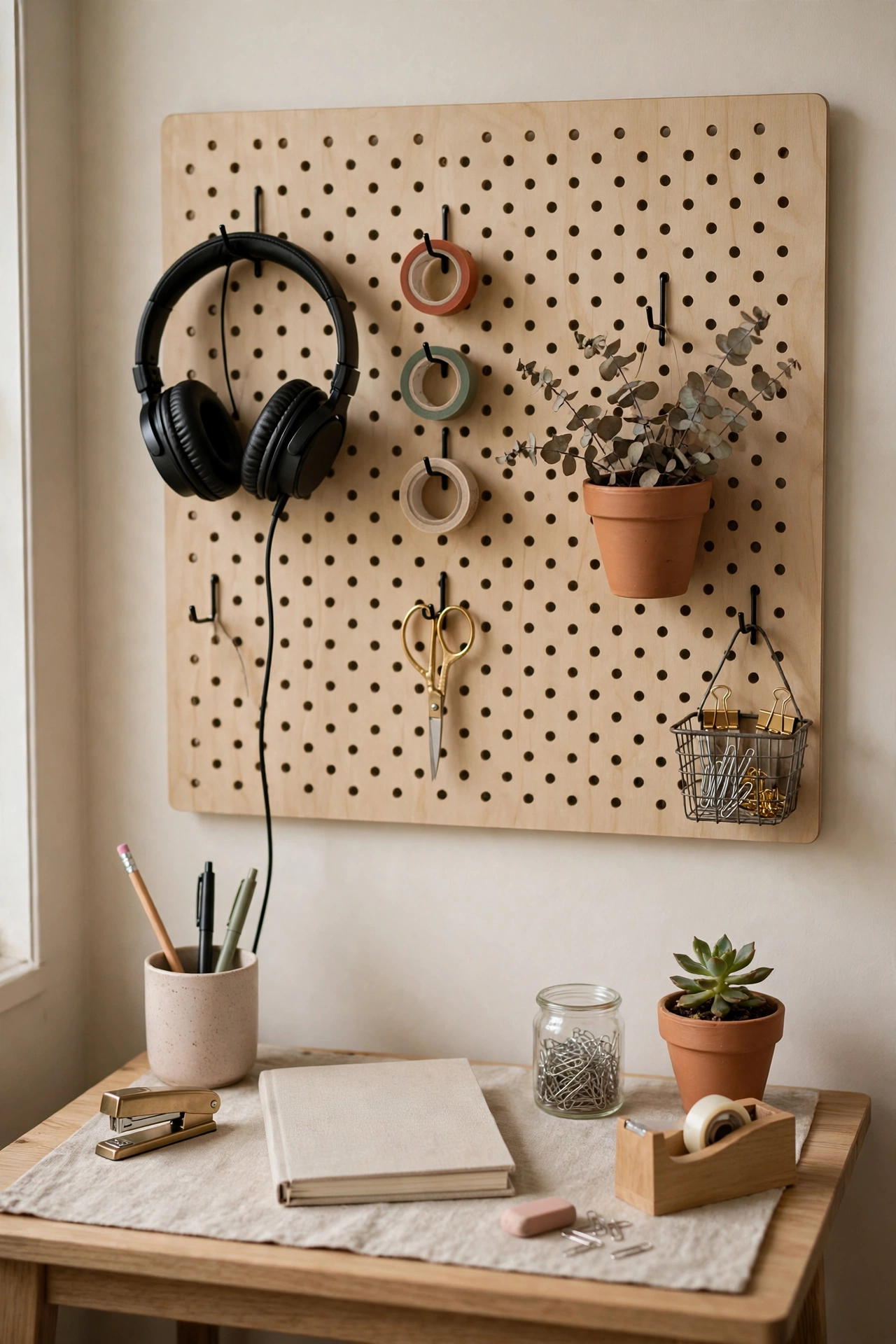
A pegboard above the desk moves scissors, tape, charging cables, and headphones off the surface and onto the wall, where they stay visible and within reach. Hang the board 18 to 24 inches above the desk surface, anchor it into studs with hardware rated above the loaded weight, and use hooks, small shelves, and cups made for pegboard. Renters can use a freestanding pegboard panel that leans against the wall with an anti-tip strap, or adhesive hooks rated for each item, instead of drilling. Keep only items you use weekly on the board, and move the rest into a box under the desk.
Try this: hang the headphones on a wide hook at the edge of the board so the cord never crosses the work surface.
Cost: $. Difficulty: Moderate.
9. Rolling drawer unit tucked under the desk
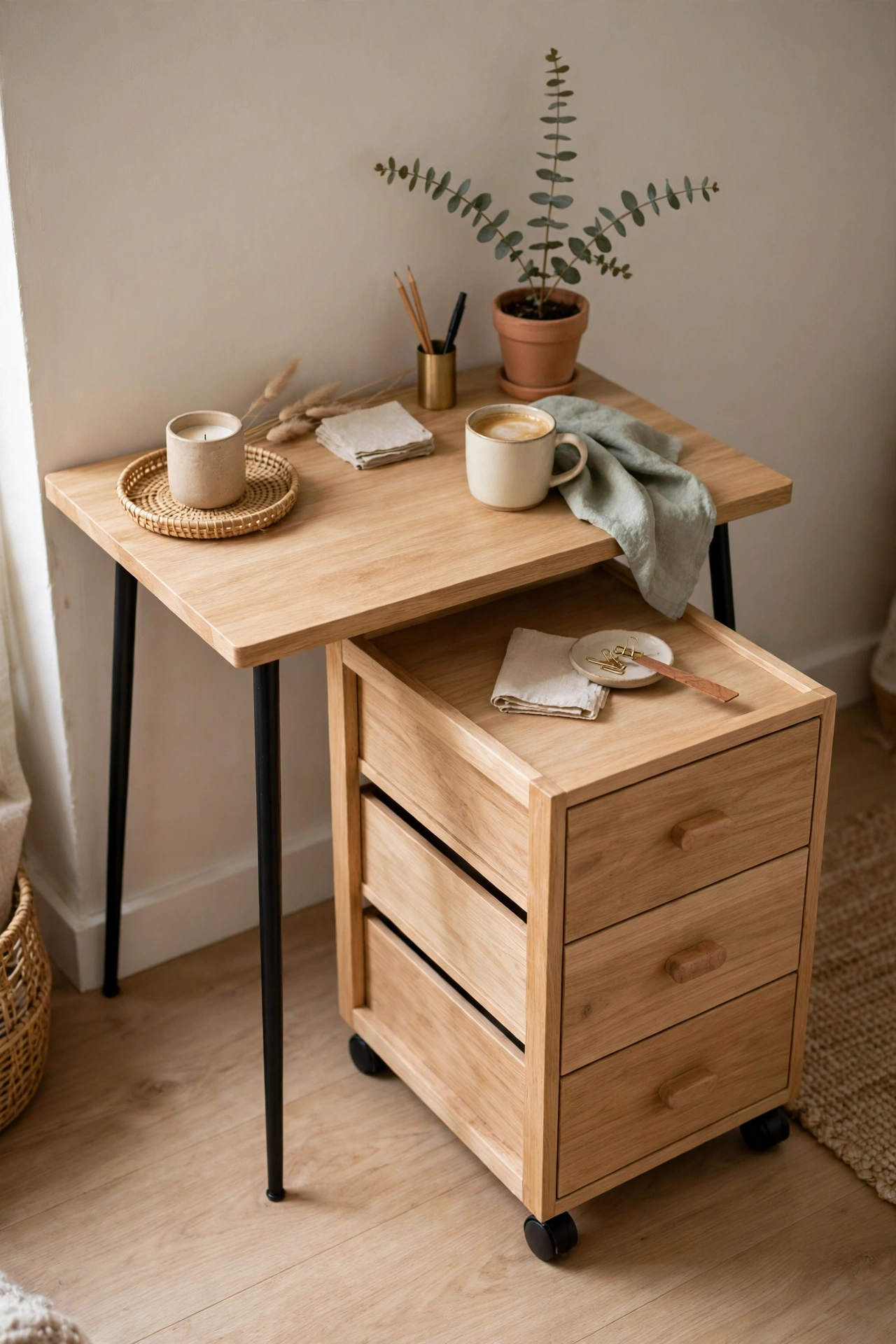
A slim rolling drawer unit slides under the desk and holds everything that used to pile on the surface, from pens and chargers to notebooks and cables. Pick a unit no wider than the knee space allows, usually under 16 inches wide, and check that your chair still fits beside it if the unit shares the knee well. Clear plastic drawers let you see contents at a glance, while a unit with a flat top doubles as a side surface when pulled out. Pull it out when you need something, then push it back under the desk so the floor stays clear.
Try this: label the top drawer for daily items and the lower drawers for reference material you touch weekly.
Cost: $. Difficulty: Easy.
10. Zoned layout on a 36-inch desk

Zones stop a small desk from turning into one mixed pile, because each part of the surface has one job. Set a computer zone on one side for the screen, keyboard, and mouse pad, a writing zone on the other side for a notebook and pen, and a supply zone behind the monitor for tape, scissors, and a stapler in a small organizer. Keep a personal zone, phone and water bottle, at the far edge away from the keyboard, so a spill never reaches the laptop. This layout works on a desk as small as 36 inches wide, and it works because nothing crosses zones during the day.
Try this: use a desk mat to mark the computer zone, so supplies stop drifting into the keyboard area.
Cost: $. Difficulty: Easy.
11. Bedside desk that doubles as a nightstand

A compact desk beside the bed does two jobs: it holds a lamp, alarm clock, and book at night, and it holds a laptop during work hours. Pick a desk about 30 inches wide with a drawer or lower shelf, so bedtime items have a home that does not compete with the laptop. A clamp-on lamp saves surface space, and a small basket under the desk holds the charger and notebook when the workday ends. Keep the desk out of view from the bed if you can, since a visible workstation makes it harder to switch off at night.
Try this: close the laptop and slide it into the drawer at night, so the bedside reads as a bedroom again.
Cost: $$. Difficulty: Easy.
12. Window-sill extension desk in daylight

A deep window sill can extend into a mini desk with a custom board, which gives excellent natural light in the smallest possible footprint. The board should sit at desk height, about 29 to 30 inches, and extend at least 16 inches deep for a laptop and a small notebook. Put the screen at right angles to the window to avoid glare, and use a compact chair or stool that slides fully under the board when not in use. Check that the board is anchored into studs or solid framing, since a sill alone will not hold typing load safely.
Try this: add a slim curtain or blind control on the window side, so afternoon sun never washes out the screen.
Cost: $. Difficulty: Moderate.
How to choose the right small desk setup
Start with measurements, not furniture. Measure the width and depth of the spot, the knee clearance under any board or desk (about 24 inches wide, 18 inches deep, and 26 inches high at minimum), and the walkway in front, so the chair pulls out without hitting anything. Then decide the screen setup: laptop-only work fits desks from 30 inches wide, while a monitor plus external keyboard needs 36 to 42 inches wide and 20 to 24 inches deep. Next, decide fixed versus fold-away: a fixed desk suits daily full-time work, while a fold-down desk, rolling cart, or cloffice suits shared rooms and renters. Finally, put storage above or below the desk, never beside it, since a side unit eats the walkway and the knee space at once.
Small desk setup comparison table
Cost key: $ means $1 to $10, $$ means $11 to $99, $$$ means $100 to $999, $$$$ means $1,000 and up. Costs cover the main piece or kit for each setup, not the laptop or monitor.
| Setup | Cost | Difficulty | Best for |
|---|---|---|---|
| Fold-down wall desk | $$ | Moderate | Shared rooms, renters with permission to drill |
| Cloffice desk | $$ | Involved | Bedrooms with a spare closet |
| Ladder desk | $$ | Easy | Narrow corners, renters |
| Rolling laptop cart | $ | Easy | Multipurpose rooms, laptop-only work |
| Narrow console desk | $$ | Easy | Studios, living rooms |
| Monitor arm, laptop closed | $$ | Moderate | Daily monitor work on a small desk |
| Laptop stand and keyboard | $ | Easy | Laptop workers, tight budgets |
| Pegboard wall | $ | Moderate | Supply-heavy desks, renters with no-drill options |
| Under-desk rolling drawers | $ | Easy | Desks with no drawers |
| Zoned 36-inch desk | $ | Easy | Fixed small desks that feel cluttered |
| Bedside desk-nightstand | $$ | Easy | Bedrooms, dual-purpose furniture |
| Window-sill extension | $ | Moderate | Bright rooms with a deep sill |
Common mistakes to avoid
Buying a full desktop tower for a 40-inch desk without a plan for where the tower lives is the fastest way to lose knee space. Dual full-size monitors with no arm crowd a small desk and push the keyboard too close to the edge, so use smaller screens with a dual arm or one good primary display instead. Spreading supplies horizontally across the surface fills a small desk in a day, while wall storage and under-desk units keep the surface clear. A chair with arms that will not tuck under the desk wastes the knee space you just saved, and decorative clutter that competes with work tools turns a workstation back into a shelf. Check knee clearance and walkway space before you buy, not after.
Safety notes
Anchor wall-mounted desks, shelves, pegboards, and leaning ladder desks into wall studs with hardware rated above the load, and use anti-tip straps on tall or leaning units. For anchoring guidance, see the CPSC Anchor It guidance. In homes built before 1978, test for lead paint and follow lead-safe rules before sanding or drilling, as described in the EPA Renovation, Repair and Painting program. Hire a licensed electrician for new outlets or hardwired lights, and clip cords along baseboards and under the desk so they stay out of walkways. Keep monitor and laptop heat vents clear, keep heavy items secure so nothing falls from a shelf, use a stable step stool (never a chair) for high shelves, and keep a cloffice ventilated with doors ajar or louvered doors so heat and electronics never build up in a closed closet.
More home ideas you may like
If you want desk styles for rooms of any size, not just small ones, start with our guide to 26 Beautiful Desk Setup Ideas for a Workspace You Actually Want to Sit At.
If your office also needs a place to rest between work sessions, see 18 Office With Couch Ideas for a Workspace That Lets You Rest Too for layouts, couch types, and work and lounge zoning.
If you work in a cubicle rather than at home, 25 Cozy Cubicle Inspiration Ideas for a Cute and Productive Workspace covers cubicle decor that stays professional.
If you want a cozy, styled home office look, 7 New Home Office Ideas for Women That Feel Cozy and Stylish has desk setups, plant workspaces, and window-light layouts.
If your workspace sits in a garden room or shed, 12 Garden Office Interior Ideas for a Productive Backyard Workspace covers built-in desk walls, daybed offices, and library offices.
Frequently asked questions
What is the smallest desk size that still works for a productive setup?
For laptop-only work, a surface around 30 to 32 inches wide by 16 to 18 inches deep is the lower bound most people find usable. If you use an external keyboard and a 24 to 27 inch monitor, aim for 36 to 42 inches wide and 20 to 24 inches deep, so you have room to keep the keyboard 8 to 10 inches from the desk edge. A practical minimum knee clearance is about 24 inches wide, 18 inches deep, and 26 inches high.
Can dual monitors work on a small desk?
Yes, but only with smaller screens and a dual arm. Both screens should be 24 inches or smaller, or one should be a portable display, and a dual arm keeps the stands off the surface. Many people get more done with one good primary display plus a laptop as needed, since two large screens on a small desk push the keyboard too close to the edge.
How do I mount a wall desk safely if I rent?
For fixed, weight-bearing installations, anchor into wall studs with screws or a French cleat system rated above the load, and follow the desk and bracket maker load ratings. Drywall anchors alone do not suit shifting weight from typing or leaning. Renters can use no-drill options instead: leaning ladder desks with anti-tip straps, freestanding shelves with a pull-out work surface, rolling carts, or clamp-on lights and monitor arms.
How can I keep cables and power tidy in a tiny workspace?
Mount a single surge-protected power strip under the desk and route everything to it, so only one cord reaches the wall. Stick-on cable clips and an under-desk tray hide runs along the desk edge and baseboards, and a compact USB-C hub or dock mounted behind the monitor turns several device leads into one tether. A vertical laptop stand can remove two or three cables from the work surface at once.
How do I keep a cloffice cool and well-lit?
Closets trap heat, especially with closed doors and electronics running. Keep doors ajar during use or swap to louvered doors if your lease allows it, and add a quiet USB fan near the top to exhaust warm air, with a small intake near the floor. Do not block vents with bins or cable bundles. For light, use an LED strip or low-glare task light under a shelf in neutral-white 4000 to 5000 K, so the light stays even and shadow-free.
Final thoughts
Start with the measurement, then pick the one setup that fits it, and move storage off the surface before you buy anything new. My 32-inch corner still works today because the shelf above holds the supplies, the drawers below hold the rest, and the surface holds only the laptop and a notebook.
For keeping a small desk tidy once it is set up, see our guide to 18 Small Desk Organization Ideas for a Desk That Stays Tidy for bamboo drawer dividers, wall file pockets, labeled cable trays, a hidden charging station, and a two-minute reset routine.
For decorating an office at work that is not your home, see our guide to 20 Ways to Decorate Your Office at Work Without Breaking Office Rules for a removable wall kit, a video-call backdrop, a visitor corner, a hot-desk kit, and a move-ready decor box.
For a dedicated learning space for kids, see our guide to 22 Home School Room Ideas for a Learning Space Kids Actually Use for a closet classroom, a rolling cart station, reading nooks, subject zones, and a thrifted setup.
For a classy office, see our guide to 15 Classy Office Decor Ideas for a Room That Looks Polished, Not Stuffy for a deep green accent wall, a walnut writing desk, a leather chair, a classic bookshelf, and layered brass lighting.


